
Introduction to Python
What is Python?
Python is a simple, widely-used programming language that doesn’t require compilation. It’s executed directly by an interpreter, making it easy to learn and use. Python has extensive documentation and a large community for support.
Before reading I recommend having basic programming language knowledge.
Compared to low level languages, Python is simpler and easier to write code in.
The trade-off is because things like memory management are handled for you, there is a cost under the hood - this may impact performance depending on code as this code is still run when you call built-in functions. Although in the modern age this is rarely a consideration unless programming with very limited hardware.
Variables
You do not need to declare the type of variable, Python can infer this for you. While each variable does have a type, we do not need to explicitly state which type it is when we create the variable.
int counter = 0;
#becomes
counter = 0
Common variable types
bool - A value that is either true of false float - a decimal number int - an integer str - a string.
Long and double are automatically handled via int - Python knows what data type should be used for larger and smaller numbers.
Python collections (Arrays)
list - Ordered, changeable and allow for duplicate values. created with square brackets Stores any variable type, elements can be referenced by index [0] starting from 0.
list = ["cale", "user", "admin"]tuple - An ordered and unchangeable collection of data, allows for duplicate values. Usually used to store just 2 or 3 values together, such as co-ordinates. Created with round brackets.
tuple = (12.3, 10.7)set - unordered, unindexed and unchangeable. Stores each value only once. Created with curly brackets
set = {"user", "admin"}dict - Ordered and changeable, no duplicates. Can be used to store data in key:value pairs. written with curly brackets;
dict = {
"username": "admin"
"password": "123456"
"created": "20241013"
}
Dictionaries cannot have two items with the same key; duplicate values will overwrite existing values. Dictionariy values can be of any data type, including array data types.
dict = {
"username" : "admin"
"device_id" : ["pc_1", "mobile_phone", "laptop_3"]
}
Comments
# (hashtag) - starts a line that contains a Python comment
#prints approved usernamesContains a comment that indicates that the purpose of the code that follows it is to print approved usernames.
””” (documentation strings) starts and ends a multi line string that is used as a Python comment; multi line comments are used when you need more than the 79 character single line comment.
"""
This program is designed to ask the user for input on a user name.
It then checks the approved_users data base to see if the entered name is present,
If the name is found it returns a print statement declaring the user is valid,
otherwise it will return an error message indicating the user has not been found in the approved list.
"""
A multi line function that indicates the purpose of the program.
Conditional statements
if - starts a conditional statement
if device_id != "fg314jh":Starts a conditional statement that evaluates whether the device_id variable contains a value that is not equal to “fg314jh”.
if user in approved_users:starts a conditional statement that evaluates if the user variable contains a value that is also found in the approved_users variable.
elif - Only evaluated when previous conditions evaluate to false.
elif status == 500:when previous conditions return false, evaluates if the status variable contains a value equal to 500.
else - If all conditions before it return false, this condition is used instead.
else:when all previous conditions evaluate to false, Python executes the code within this else statement.
and - requires both conditions on either side of the operator to evaluate to true.
if username == "cale" and login attempts < 5:Returns true if the value in username is equal to “cale” and the value of login attempts is less than 5.
or - requires only one of the conditions on either side of the operator to be true.
if status == 100 or status == 102:Returns true and executes indented code if the value in status variable is equal to 100 or 102.
not - negates a condition so that it evaluates to false if the condition is true or vice-versa.
if not account_status == "removed"returns false if the value in account status is equal to “removed” and returns true if the value is not equal to removed.
Iterative statements (Loops)
There are no do-while loops in Python, while loop is convention.
While - used to iterate based on a condition
while login_attempts < 5:iterates as long as the condition that the value of login_attempts is less than 5 returns True.
For - Used to iterate through a specified sequence.
for username in ["cale", "admin", "user"]:iterates throught the lements in the list, using the loop variable username.
for i in range(10):iterates through each number created by range(10) using the loop variable i.
Break - used to break out of a loop.
Continue - Skip a loop iteration and continue with the next one.
User-defined functions
def - placed before a function name to define a function
def main():
	bark(3)
#bark some number of times
def bark(n):
	for i in range(n):
		print("bark")
main()
A function abstracts away the barking. A main function is defined at the top of the file, at the bottom the main function is called. It is convention to create a main function in Python, but not necessary.
return - used to return information from a function, when executed, Python exits the function after returning the information
def calculate(x, y):
	total = x + y
return total
returns the value of the total variable from the calculate function.
Built-in functions
Python is object orientated, properties, attributes and functions are known as objects. Functions in python can belong to a specific object, this is known as a method. For example, strings can have built-in methods;
s = washington.upper()
print(s)
#returns WASHINGTON
the value of s is overwritten with the result of .lower(), a built in method of strings.
Lots of useful functions and methods are already built-in Python and ready to use. Below are some commonly used functions, more can be found in the documentation.
print() - outputs a specified object to the screen
(f””) (formatted strings) - by adding f before the quotation mark we indicate we are using a formatted string, this allows embedded expressions using {} (curly braces)
print(f"Username is {input("User: ")}")type() - returns the data type of its input
range() - generates a sequence of numbers
max() - returns the largest numeric input passed into it.
min() - returns the smallest numeric input passed into it.
sorted() - sorts the components of a iterable.
str() - converts the input object into a string
len() - returns the number of elements in an object.
Average of three numbers using a list;
\# logins per day
logins = [6, 7, 7]
\# print the average
average = sum(logins) / len(logins)
print(f"Average: {average}")
The built in sum and len methods make this program simple.
Importing modules and libraries
As projects becomes larger, it will become useful to write functions in one file and run them in another. We can create one file called functions.py with the below
def square(x)
	return x * x
and another file called square.py with the code
import - searches for a module or library in a system and adds it to the local python environment.
from functions import square
for i in range(10)
	print(f"the square of {i} is {square(i)}")
we could alternatively import the entire functions module and use dot notation to access the square function
import functions
for i in range(10)
	print(f"the square of {i} is {functions.square(i)}")
Many in-built libraries such as math or csv are available, additionally Python has many community libraries allowing for lots of complex functionality to be abstracted away from you as you work off the shoulders of those before you.
The sys library has built in methods that are very useful in the command line. You can print all command line arguments using the below;
from sys import argv

for arg in argv:
	print(arg)
The first argument is the name that of the file that you are running.
from sys import argv

if len(argv) == 2:
	print(f"hello, {argv[1]}")
else:
	print("hello")
Print hello to the first user argument (second arg value) if it exists.
sys.exit() - exits the program with specified exit code.
import sys

if len sys.argv != 2:
	print ("missing command-line argument")
	sys.exit(1)
print(f"hello, {sys.argv[1]}")
sys.exit(0)
Notice that methods (dot notation) are used to utilize the built in functions of sys.
File operations
open() - returns a file object. open() takes 2 parameters, filename and mode. there are 4 modes;
“r” - read - returns error if file does not exist
“a” - append - creates file if it does not exist
“w” - write - creates file if it does not exist
“x” - create - returns error if the file exists
files can be read as binary “b” or text “t”.
default value for mode is “rt” (read, text), you do not need to specify this.
file = open("accesslog.txt", "r")If the file is located in a different location than the python program, you will have to specify the full pathname.
.read() - returns the file content
.write() - writes the specified string to the file
.close() - closes the file when you are finished with it, this is best practice when you are done with the file.
Another way to handle the opening and closing of a file is to encase it inside a with condition;
with open('access_log.txt') as logs:
	if banned_user in logs:
		# further processing goes here
The with statement handles closing of the file once it leaves the with block, even if there is an error. This allows for cleaner code and makes handling of unexpected errors easier.
Regular expressions
Regular expressions (RegEx for short) are a means to ensure that user-provided data fits a specific format. Python has a build in library called re which can be used to work with regular expressions.
import re - Uses expression symbols to find patterns in strings.
re.findall() - returns a list containing all matches
re.fullmatch(pattern, string, flags) - returns object only if the whole string matches the pattern, else returns none.
re.compile() - compiles a pattern into a regex object; useful for effeciency when pattern matching more than once.
Metacharacters, special sequences and sets - A special sequence is a \ followed by a character, a set is a set of characters inside a pair of brackets []. Special sequences, Metacharacters and sets all have a special meaning.
Case study: Valid email
When taking an input from a user we may want to validate an email address for a variety of reasons; this could be done simply with;
(username)@(domain name).(at least 2 letters - top level domain name)
The above can be represented as a regex in Python with the below;
r'^[a-zA-Z0-9._%+-]+@[a-zA-Z0-9.-]+\.[a-zA-Z]{2,}$'
This is very cryptic, some syntax is explained below;
r - used to prefix a regex string where you want to ignore \ (backslash) normally used in python; this is to prevent you having to write \\\\ (four backlashes) to match a single backslash since the regex version is \\ but each backslash must be escaped with another backslash per Python’s usage of the escape character.
^ - starts with
[A-Z] - returns a match for any upper-case character alphabetically
[a-z0-3] - returns a match for any lower-case character alphabetically and numbers 0-3
. - is a wildcard for any character except newline
+ - returns one or more occurrences
{} - returns the exact specified number of occurrences
$ - ends with
Most use-cases for regexes have already been solved by those before you, search engines and AI are your friends here.
Let’s use the above and create a simple function to check if a email is valid or not;
import re
regex = re.compile(r'^[a-zA-Z0-9._%+-]+@[a-zA-Z0-9.-]+\.[a-zA-Z]{2,}$')

def checkemail(email):
    if re.fullmatch(regex, email):
      print("Valid email")
    else:
      print("Invalid email")
The proposed so far while cryptic is in fact very simple, to mitigate security risks and handle a wider range of valid email addresses it is best to adhere to RFC 5322
RFC5322 - the document that specifies the internet message format (IMF), a syntax for text messages that are sent via E-mail.
This document contains the definition of what an email should look like; when conforming to this definition you will have a regex like below;
(?:[a-z0-9!#$%&'*+/=?^_`{|}~-]+(?:\.[a-z0-9!#$%&'*+/=?^_`{|}~-]+)*|"(?:[\x01-\x08\x0b\x0c\x0e-\x1f\x21\x23-\x5b\x5d-\x7f]|\\[\x01-\x09\x0b\x0c\x0e-\x7f])*")@(?:(?:[a-z0-9](?:[a-z0-9-]*[a-z0-9])?\.)+[a-z0-9](?:[a-z0-9-]*[a-z0-9])?|\[(?:(?:(2(5[0-5]|[0-4][0-9])|1[0-9][0-9]|[1-9]?[0-9]))\.){3}(?:(2(5[0-5]|[0-4][0-9])|1[0-9][0-9]|[1-9]?[0-9])|[a-z0-9-]*[a-z0-9]:(?:[\x01-\x08\x0b\x0c\x0e-\x1f\x21-\x5a\x53-\x7f]|\\[\x01-\x09\x0b\x0c\x0e-\x7f])+)\])
This RFC5322 compliant regex expression is more clearly readable as a diagram
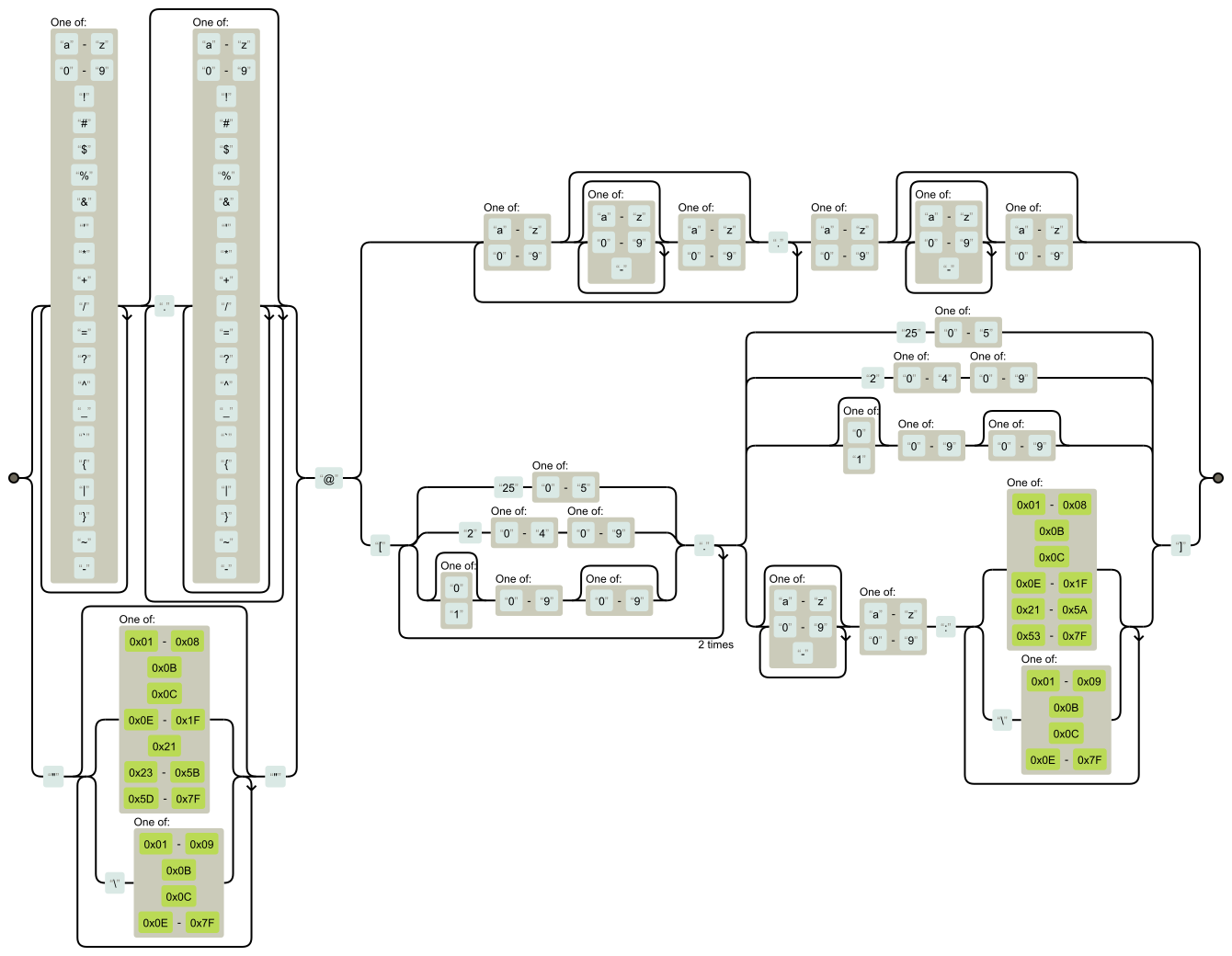
Taken from https://emailregex.com/wp-content/uploads/sites/2/2014/06/General-Email-Regex-Railroad-Diagram-emailregex.com_.png.
While an improvement, this is not foolproof. Email addresses can be complex and subject to various rules and standards, best practice is to consider additional factors such as MX record checks, server-side validation and DNS validation to ensure accuracy and security.
Regex has many more use-cases, consider passwords - you can create rules such as minimum length, mix of uppercase and lowercase letters.
This is far more efficient than creating a series of if-else statements or custom functions. regex functions such as search() and split() can help determine what specific improvements a user needs to make, such as “Password not long enough”.
Always remember to think of the end-user, avoid overly restrictive rules that impede their experience.
Further reading
More information and discussion about Email regex.
Python has lots to offer, far more than can be covered here, consider free resources such as;
- Harvard University’s introduction to programming - https://cs50.harvard.edu/x/
- W3 schools -www.w3schools.com/python
- Python documentation - https://docs.python.org
Need some direction? try learning about the below as a next step;
- Classes
- Lambda functions
- Decorators
- String methods
- List, set, tuple and dict methods.