
Managing Users in Linux
Managing users in Linux and their permissions
The following will be useful for administrating users via a Linux system; this assumes familiarity with ls -la.
Permissions and ownership
Recall that
ls -lareturns a list of files and directories and their permissions
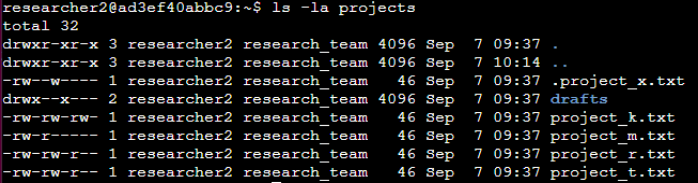
Permissions in Linux are printed as a 10 character string, drwxrwxrwx. The first character represents whether permissions are associated with a directory (d) or a file (-).
The next 9 characters represent permissions in groups of 3 characters for the three groups; User, Group and then other (everyone else). R = read, W = write, x=execute, - (hyphen) = null.
chmod - change permissions on files and directories
chmod u+rwx, g+rwx, o+rwx login_sessions.txtChanges user (u), group (g), and other (o) permissions to add (+) read (r), write (w), and execute (x) permissions for the login_sessions.txt file
chmod u-wx, u+r, g-wx, g+r, o-rwx projects/.project_x.txtHidden files start with a . (period) Changes privilege’s so that only the user and the group can read the file.
chmod g-rwx, o-rwx draftschanges the directory permissions of the drafts folder so that only the user can interact with the directory.
chown - change ownership of a file or directory, used with sudo (more on sudo below)
sudo chown cale access.txtChanges the user owner of access.txt file to cale.
sudo chown :security access.txtchanges the group owner of access.txt to security, a colon (:) must be entered before the group name.
groupdel - deletes a group from the system, used with sudo
sudo groupdel accountingdeletes accounting as a group
sudo - super user do Temporarily grants elevated permissions to specific users, users must be in a sudoers file to have access to sudo.
sudo useradd caleGrants elevated permissions to the user running this command so that this user can use the useradd command to add cale as a new user to the system.
useradd - adds a new user, used with sudo
sudo useradd -g security caleadds cale as a new user and uses the -g option to set their primary group as security.
sudo useradd -G finance,admin caleadds cale as a new user and uses the -G option to add them to the supplemental groups of finance and admin.
userdel - deletes a user from the system, used with sudo
sudo userdel caledeletes cale as a user.
sudo userdel -r caledeletes cale as a user and removes all file in their home directory.
usermod - modify an existing user, use with sudo
sudo usermod -g finance caleuses the -g option to change the existing cale user’s primary group to be the finance group.
sudo usermod -G accounting caleuses the -G option to replace any supplemental groups that the existing cale user is in with the supplemental accounting group. Removes all other groups cale is in.
sudo usermod -a -G finance caleuses the -a -G options to append the finance group to the user cale, this will not remove existing user groups from the user.
sudo usermod -d /home/cale_buses the -d option to change the existing cale user’s home directory to /home/cale_b.
sudo usermod -L caleuses the -L option to lock the existing cale user’s account so that they cannot log in.
sudo usermod -l caleb caleuses the -l option to change the existing cale user’s login name to caleb.