
Murder in SQL city
A way to practice SQL
Knight lab from the Northwestern University in the USA has a great web app that can be used to practice your SQL skills in a fun and engaging manner.
What follows is a walkthrough and explanation of solving the murder mystery of SQL city; this activity can be found at https://mystery.knightlab.com/
Some useful resources to help learn SQL:
An interactive book, practice queries against real data, only takes a few hours and is completely free. This resource explores data relating to executions in Texas from 1976 and it very interesting to analyze in its own right.
Harvard’s CS50 lecture on SQL (week 7, 2024)
A lecture on SQL that is part of Harvard’s introduction to computer programming. A great course to take if you want to gain a bottom-up understanding of programming transferable to any language.
Introduction
A crime has taken place and the detective needs your help. The detective gave you the crime scene report, but you somehow lost it. You vaguely remember that the crime was a murder that occurred sometime on Jan.15, 2018 and that it took place in SQL City.
Solving the mystery
Before moving to solve the crime we first need to gain an understanding of the data structure itself. This website uses SQlite, to view the schema we can use the below command to query the sqlite_master, a table which contains all the metadata about all objects in the database. We will restrict this query to showing just the tables to gain a high level overview of the dataset.
SELECT name
FROM sqlite_master
where type = 'table'
There are many different versions of SQL and each will have their own way of viewing the schema, be sure to check the documentation on how to do this.
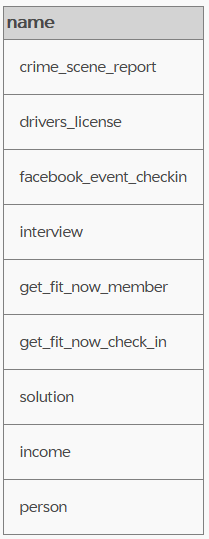
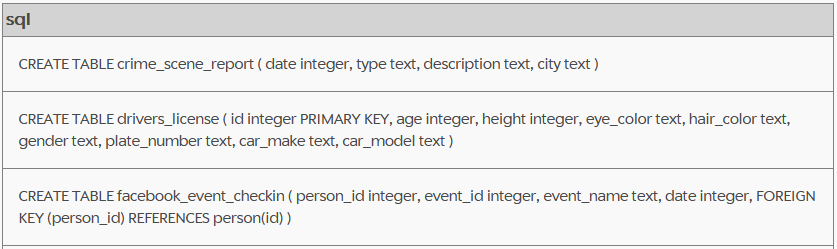
We can also query how each table was made by querying
SELECT sql
FROM sqlite_master
This identifies how each table was made and what types of values populate each column.
Next we will query the specific table we are currently interested in. We start by using the * (wildcard) to see all data and use the LIMIT keyword to only display the first 3 entries, this allows us to gain an understanding of the syntax used for the data.
SELECT *
FROM crime_scene_report
LIMIT 3;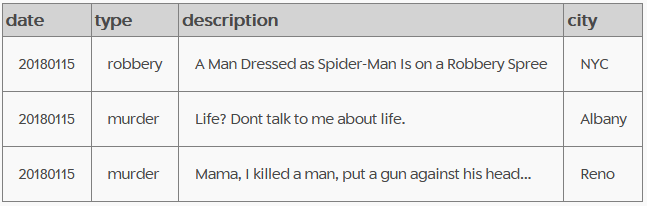
We now know what we are working with, time to start by retrieving the corresponding crime scene report from the police department’s database.
SELECT *
FROM crime_scene_report
WHERE date = '20180115';
This report gives us 2 clues about potential witnesses, we will need their person_id to query the witness table for their transcripts.
To get the last house on Northwestern Drive from the persons table we will apply filters to order by address number in descending order.
SELECT *
FROM person
WHERE address_street_name = 'Northwestern Dr'
ORDER BY address_number DESC;
Next we will apply filters to search for anyone named Annabel who also lives on Franklin Avenue.
SELECT *
FROM person
WHERE address_street_name = 'Franklin Ave'
AND name LIKE 'Annabel%';
We now have the id from 2 witnesses, We can now search the witness table using the person_id.
SELECT *
FROM interview
WHERE person_id = '14887'
OR person_id = '16371'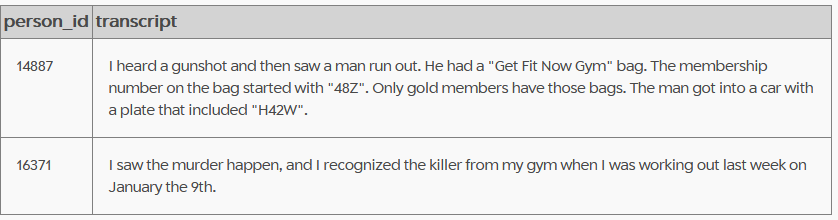
These transcripts give information relating to 3 different tables; we will have to use all the provided information to try and match the data with 1 search using a nested JOIN query, we will try and return a name from the person table bringing the tables queried to 4.
SELECT person.name
FROM person
INNER JOIN get_fit_now_member
ON get_fit_now_member.person_id = person.id
INNER JOIN get_fit_now_check_in
ON get_fit_now_check_in.membership_id = get_fit_now_member.id
INNER JOIN drivers_license
ON drivers_license.id = person.license_id
WHERE get_fit_now_member.id LIKE '48Z%'
AND get_fit_now_member.membership_status = 'gold'
AND get_fit_now_check_in.check_in_date = '20180109'
AND drivers_license.plate_number LIKE '%H42W%';
This will return Jeremy Bowers as the murderer, but that is not the end of this challenge.

We query the interview table using the killers name.
SELECT transcript FROM interview
INNER JOIN person
ON interview.person_id = person.id
WHERE person.name = 'Jeremy Bowers';
This transcript provides alot of detail; by referring to the sqlite_master table we can see that we will have to query facebook_event_chein as well as drivers_license. The difficulty lies in displaying results which appear 3 times within a certain date range; this can be done using the HAVING keyword.
SELECT *
FROM person
JOIN facebook_event_checkin
ON person.id = facebook_event_checkin.person_id
JOIN drivers_license
ON drivers_license.id = person.license_id
WHERE facebook_event_checkin.event_name = 'SQL Symphony Concert'
AND  facebook_event_checkin.date LIKE '201712%'
AND drivers_license.hair_color = 'red'
AND drivers_license.car_make = 'Tesla'
AND drivers_license.car_model = 'Model S'
AND drivers_license.height > 65
GROUP BY person.id
HAVING COUNT(*) >= 3;
Key takeaways:
Data is not always clean, remember to use wildcards (* or _) rule out grammatical errors and issues.
Learn how to query the Schema for the SQL language that you are using, and recall that SELECT * FROM table LIMIT 3; is a great way to gain a quick overview of the data you are analyzing.
